Running a dental office means balancing patient care with scheduling, insurance, billing, vendor coordination, and technology that keeps everything moving. In 2026, HIPAA compliance for dental offices matters more than ever because the risk landscape has changed.
Patient information is no longer just paper charts and filing cabinets—it’s appointment reminders, imaging files, cloud-hosted practice software, email attachments, text messages, digital forms, and backups.
That broader “data footprint” creates real exposure. Cyberattacks like ransomware and phishing are targeting healthcare operations because downtime is costly and pressure to restore access is high.
At the same time, audits and investigations increasingly focus on whether you can prove you follow the rules—meaning written policies, documented risk analysis, workforce training records, vendor agreements, and consistent execution.
Beyond enforcement, there’s a human reason to care: patient trust. Your patients share medical histories, insurance details, and payment information because they assume you’ll protect it. When privacy is handled well, it strengthens confidence in your practice.
When it’s handled poorly, even small mistakes (a front-desk conversation, a mis-sent email, a shared login) can create lasting damage.
This guide is practical, workflow-based educational guidance—not legal advice. It’s written for dentists, practice owners, office managers, and compliance coordinators who want a clear path to meet HIPAA requirements for dental practices in a way that works in real life.
HIPAA Basics for Dental Teams: What It Is and Who Must Comply

HIPAA is a set of privacy and security rules designed to protect patient information. The simplest way to think about it is this: if your practice creates, receives, maintains, or transmits patient information in connection with healthcare operations, you must protect it according to HIPAA rules for dental practices.
Most dental offices fall into the category of covered entities because they provide care and conduct standard administrative transactions such as eligibility checks, claims, and payment activities.
HIPAA also applies to a practice’s business associates—outside vendors that handle protected information on your behalf, like practice management software providers, cloud storage services, billing companies, IT support, shredding vendors, answering services, and certain marketing or patient communication vendors.
HIPAA protects protected health information (PHI)—information that can identify a patient and relates to their health, care, or payment. PHI can exist in many forms:
- Paper (charts, printed schedules, referral letters)
- Verbal (conversations in operatories, phone calls, voicemail)
- Electronic (ePHI: digital charts, x-rays, emails, cloud backups)
A dental office doesn’t need to be “high tech” to have HIPAA exposure. If you text appointment details, scan insurance cards, email referrals, store images, or use a cloud-hosted practice system, you’re dealing with ePHI and must meet HIPAA compliance requirements for dentists.
The Core HIPAA Rules Dental Practices Must Follow in 2026
HIPAA regulations for dentists are usually discussed in three main components: the Privacy Rule, the Security Rule, and the Breach Notification Rule. These rules work together. The Privacy Rule focuses on how PHI can be used and shared.
The Security Rule focuses on how ePHI must be protected. The Breach Notification Rule focuses on what you must do if unsecured PHI is compromised.
This matters because most dental offices operate with hybrid information systems—some paper, some digital, some “in between” (like scanned documents or PDFs emailed to specialists). Your compliance program needs to cover all of it, including how information moves through your office from first phone call to final billing.
In 2026 best practices, regulators and auditors tend to look for two big themes:
- You identified your risks and addressed them.
- You can prove it with documentation and consistent behavior.
That’s why risk analysis, risk management, workforce training, vendor oversight, and audit-ready documentation show up repeatedly in modern enforcement and guidance.
Privacy Rule: Practical Compliance for Everyday Dental Workflows
The Privacy Rule sets standards for how your practice uses and discloses PHI and establishes patient rights. In daily operations, it affects the front desk, clinical handoffs, referrals, billing, and even how you confirm appointments.
A key principle is the minimum necessary standard: when using, sharing, or requesting PHI (outside of certain exceptions), limit it to what’s needed to do the job.
This does not mean staff can’t access charts; it means access should match roles and tasks. A hygienist may need clinical history, while a scheduling coordinator may only need appointment and contact information.
In dental offices, Privacy Rule success looks like controlled conversations, careful handling of printed items, thoughtful patient communication, and clear rules for when PHI can be shared with family members or other providers. It also means having a well-written Notice of Privacy Practices (NPP) and distributing it correctly, then updating it when required.
Patient Rights You Must Support in Real Life
Patients have rights related to their PHI, and your office needs a predictable process to respond. In practical terms, this includes the right to access records, request amendments, request restrictions in certain situations, and request confidential communications.
To make this workable, build a simple intake-to-fulfillment workflow:
- A standard request form (paper or digital)
- A tracking log (date received, staff owner, deadline, outcome)
- A consistent method to verify identity before releasing records
- A secure delivery method (secure portal, verified email workflow, or in-person pickup with ID)
When offices struggle here, it’s usually because requests are handled “case by case” without a process. That creates delays, inconsistency, and documentation gaps.
Notice of Privacy Practices: Make It Readable and Realistic
Your NPP is not just a formality. It’s the document patients rely on to understand how information is used, what their rights are, and how to file a complaint. Requirements for what must be included are specific, and you must revise and redistribute it when there’s a material change in privacy practices.
For dental practices, the most common NPP issues are:
- Outdated content that doesn’t match current communication tools
- No clear method for patients to obtain a copy later
- Inconsistent distribution (some patients get it, others don’t)
- Missing documentation showing it was offered/posted
Make your NPP usable by writing it in plain language, aligning it with your real workflows (portal, texting, email, cloud services), and training staff to explain it without sounding scripted.
Security Rule: How to Protect ePHI with Administrative, Physical, and Technical Safeguards
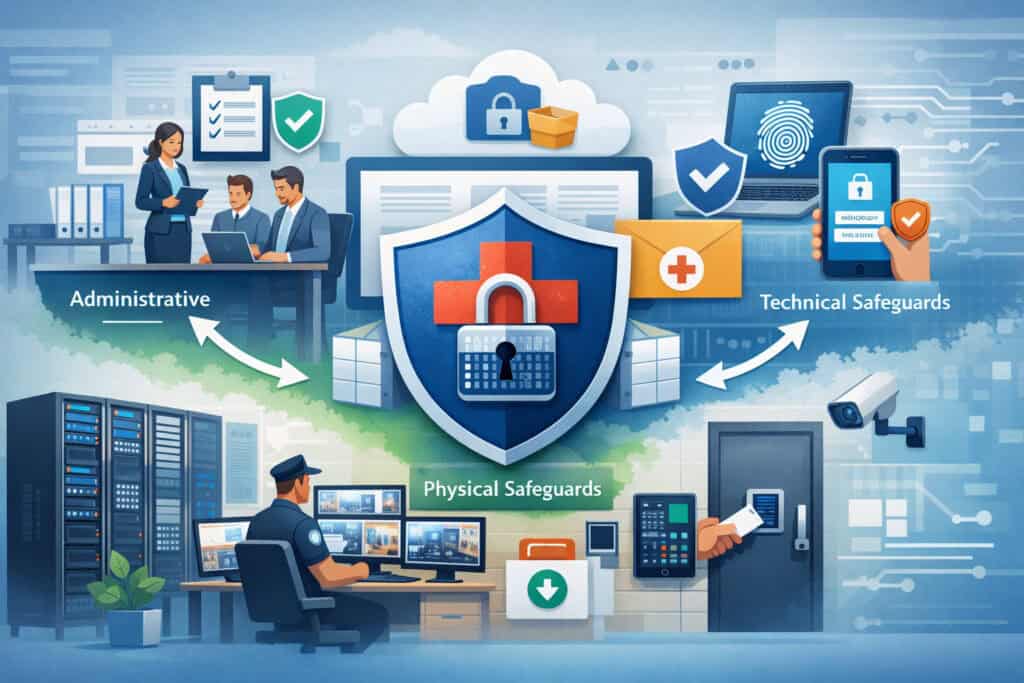
The Security Rule applies to electronic PHI (ePHI) and requires safeguards to ensure confidentiality, integrity, and availability. For dental offices, the Security Rule is often the most challenging area because it touches IT, vendors, devices, passwords, Wi-Fi, backups, and day-to-day behaviors.
It helps to think of safeguards in three layers:
- Administrative safeguards: policies, training, risk analysis, assignments of responsibility
- Physical safeguards: facility access, workstation controls, device/media handling
- Technical safeguards: access controls, encryption, audit logs, MFA, backups
A strong dental office HIPAA compliance program connects these layers to real workflows. For example, “shared logins” is not only a technical issue (access control) but also an administrative issue (policy and enforcement) and a physical issue (workstations visible to patients).
Administrative Safeguards: Policies, Responsibility, and Repeatable Habits
Administrative safeguards are what make your compliance program consistent even when staff changes, vendors change, or systems are upgraded. In a dental practice, these safeguards usually include:
- Assigning a security and privacy lead (can be the same person in small offices)
- Conducting and documenting a risk analysis
- Creating a risk management plan with timelines
- Workforce training and role-based access rules
- Sanction policy for violations (applied consistently)
- Incident response plan and testing
- Vendor oversight and Business Associate Agreements (BAAs)
- Documentation standards and retention practices
If you’re building this from scratch, start with your top workflows: scheduling, intake, clinical documentation, imaging, referrals, billing, and patient communications. Write policies that match what your office actually does, then adjust workflows to close gaps.
A strong administrative program also includes ongoing monitoring: periodic access reviews, audit log spot checks, phishing simulations (if you can do them), and a routine “security huddle” cadence.
Physical Safeguards: Facilities, Workstations, and Device/Media Controls
Physical safeguards often get overlooked because offices feel familiar and “safe.” But dental practices have a steady stream of visitors—patients, delivery staff, vendors—moving through areas where PHI may be visible.
Strong physical safeguards focus on preventing casual exposure:
- Keep schedules and charts out of public view
- Position monitors away from patient sightlines
- Use privacy screens where needed
- Lock records rooms and restrict access
- Secure prescription pads and any forms that include PHI
- Store backup drives and imaging media in locked areas
- Control who can access server closets, network gear, and routers
Workstations deserve special attention. Front desk screens often display full patient details, and clinical workstations can show imaging, notes, and treatment plans. Auto-lock settings, logoff rules, and “clear desk” practices reduce exposure.
Device and media controls are equally important. Practices frequently dispose of old laptops, external drives, scanners, and copiers without considering stored data. A compliant process includes inventory, secure wiping, and verified disposal.
Technical Safeguards: Access Controls, Encryption, MFA, Backups, and Audit Logs
Technical safeguards are where HIPAA compliance requirements for dentists meet modern cybersecurity. In 2026, offices should assume that passwords alone are not enough. Multi-factor authentication (MFA), encryption, and well-managed backups are no longer “nice-to-haves” for systems that touch ePHI.
At a practical level, technical safeguards should include:
- Unique user IDs (no shared logins)
- Role-based access (minimum necessary in practice)
- Strong password policy with MFA for critical systems
- Encryption for devices and data transmission where feasible
- Secure remote access (no open remote desktop to the internet)
- Audit logs enabled and reviewed periodically
- Backups that are tested and protected from ransomware
- Patch management for operating systems and practice software
- Secure Wi-Fi design (separate guest network, strong encryption)
Audit logs matter because they create accountability. They also help in investigations: if something goes wrong, logs can show who accessed what and when. That evidence supports your incident response and helps determine whether an event meets breach criteria.
Step 1: Conduct a Comprehensive HIPAA Risk Analysis for Your Dental Practice
A risk analysis is not a checklist you run once. It’s a structured review of where ePHI exists, how it moves, what threats exist, what vulnerabilities you have, and what the impact would be if something failed. OCR guidance repeatedly emphasizes risk analysis as a foundational requirement.
Start by mapping your ePHI environment:
- Practice management and EHR systems
- Imaging systems (intraoral cameras, radiography software)
- Patient portals and online forms
- Email systems and secure messaging tools
- Cloud storage and backups
- Billing and claims tools
- Workstations, laptops, tablets, phones
- Network components (routers, switches, Wi-Fi)
- Vendor remote access and IT tools
Then identify common threats:
- Phishing and credential theft
- Ransomware and malware
- Lost or stolen devices
- Misconfigured cloud storage
- Unpatched systems
- Inappropriate access by staff
- Accidental disclosures (wrong recipient, wrong attachment)
A strong risk analysis produces a written report with findings and recommended controls. It should also include likelihood and impact, so you can prioritize what matters most.
Step 2: Build a Risk Management Plan That Actually Gets Done
Risk analysis identifies issues. Risk management is where you decide what you will do about them, in what order, with what resources. A risk management plan should be specific enough that someone can execute it without guessing.
A practical plan includes:
- Each risk item (from the analysis)
- The chosen mitigation (control, process change, vendor change)
- Owner (person responsible)
- Target date
- Status (not started, in progress, completed)
- Evidence to collect (screenshots, policies, tickets, invoices, training logs)
Dental offices do best when the plan is short, visible, and tied to operations. It’s better to fully implement ten high-impact controls than to list fifty items that never leave the spreadsheet.
Common high-impact risk management actions for dental office HIPAA compliance:
- Eliminate shared logins
- Turn on MFA for email, remote access, and cloud tools
- Encrypt laptops and portable devices
- Separate guest Wi-Fi
- Implement secure backups and test restores
- Standardize secure messaging and stop casual texting of PHI
- Update vendor agreements and confirm responsibilities
Step 3: Implement Administrative Safeguards That Fit Dental Office Reality
Administrative safeguards work when they align with how your team actually functions. The goal is not to create a policy library—it’s to standardize safe behavior, reduce mistakes, and make compliance provable.
Here are the administrative safeguards most dental offices need to formalize:
- Privacy and security policies (plain language, role-specific)
- Workforce training at onboarding and annually, plus micro-training
- Sanctions policy (clear consequences for unsafe behavior)
- Information access management (who gets access to what)
- Device management rules (approved devices, secure setup)
- Incident response plan (who does what, when, how to document)
- Vendor management and BAAs
- Documentation and record retention standards
To make this stick, embed it into routine operations:
- Add a HIPAA check to new hire onboarding
- Require annual attestation that policies were read
- Use quick monthly reminders (phishing examples, texting rules)
- Review access when roles change or staff leave
Step 4: Strengthen Physical Safeguards Without Making the Office Feel Rigid
Physical safeguards don’t need to make your practice feel like a secure facility. Most improvements are simple: screen placement, privacy habits, locked storage, and clear boundaries around staff-only areas.
Focus on the highest-risk areas:
- Front desk and waiting room visibility
- Operatories where conversations can be overheard
- Hallways where charts or printouts travel
- Printer and fax locations
- Records storage areas
- After-hours access and cleaning staff presence
Create a “PHI exposure prevention” routine:
- Don’t call out full names plus procedures in public areas
- Use quieter voice norms and confirmation questions
- Turn documents face-down when carrying them
- Shred immediately when no longer needed
- Lock up paper charts and referral forms
- Ensure auto-lock on screens and quick logoff steps
Device and media controls deserve a written procedure:
- Inventory devices annually
- Require encryption on portable devices
- Securely wipe devices before reuse/disposal
- Use verified destruction for drives and media when needed
Step 5: Upgrade Technical Safeguards for 2026 Cyber Risk
Modern dental office HIPAA compliance depends on technical safeguards that reduce the most common causes of incidents: stolen credentials, weak remote access, unpatched systems, and ransomware.
Prioritize these technical controls:
- Access controls: unique user accounts; remove access immediately on termination
- MFA: email, remote access, cloud tools, admin portals
- Encryption: laptops, portable drives, and data in transit where feasible
- Secure messaging: approved tools; eliminate ad-hoc texting of PHI
- Audit logs: enable logging on key systems and review periodically
- Backups: offline or immutable backups; test restores routinely
- Endpoint protection: modern anti-malware/EDR when feasible
- Patch management: schedule updates and confirm completion
Ransomware is a major operational threat. Many incidents begin with phishing or reused passwords. OCR has emphasized ransomware preparedness and Security Rule alignment in guidance.
Build ransomware resilience with basics that work:
- MFA everywhere possible
- Least-privilege access
- Disable macros by default (where applicable)
- Regular patching
- Segmented networks if feasible (especially for imaging devices)
- Backups that can’t be encrypted by the same credentials
Business Associate Agreements and Vendor Management: Your Hidden Risk Area
Many dental offices assume vendors “handle compliance.” In reality, HIPAA expects you to manage vendors that create, receive, maintain, or transmit PHI on your behalf. That starts with a Business Associate Agreement (BAA) and continues with oversight.
A BAA should clearly address:
- What PHI the vendor handles
- Permitted uses and disclosures
- Safeguard expectations
- Breach reporting responsibilities and timelines
- Subcontractor requirements
- Return/destruction of PHI at termination
But a signed BAA is not enough. Vendor oversight means confirming security basics, especially for cloud tools, patient communication platforms, IT providers, and billing partners.
Practical vendor checks include:
- Does the vendor offer MFA?
- Is encryption used for stored and transmitted data?
- Do they provide audit logs?
- What is their breach notification process?
- How do they handle backups and recovery?
- Do they use subcontractors that also access PHI?
Documentation and Record Retention: Make Compliance Provable
For many offices, the biggest audit risk isn’t the absence of good intentions—it’s the absence of documentation. HIPAA expects written policies and evidence that you implemented them. Documentation is how you demonstrate compliance without relying on memory.
Your documentation set should include:
- Risk analysis report and updates
- Risk management plan with completion evidence
- Policies and procedures (privacy and security)
- Workforce training records and sign-offs
- Sanctions policy and any enforcement records
- BAAs and vendor oversight notes
- Incident response plan and incident logs
- Access reviews and termination checklists
- Backup testing records
- Device inventory and disposal records
- NPP version history and distribution method
For breach notification requirements, timelines are explicit—notification must occur without unreasonable delay and no later than 60 days after discovery in applicable situations. Good documentation helps you determine what happened and demonstrate your response.
Common Dental-Office-Specific HIPAA Risks You Should Fix First
Dental practices have predictable risk patterns because workflows are similar across offices. Fixing these common issues often provides the fastest improvement in HIPAA requirements for dental practices.
High-frequency risks include:
- Front desk conversations that reveal PHI to other patients
- Printed schedules left visible or unattended
- Paper charts moved around without tracking
- Email attachments sent to the wrong recipient
- Texting PHI from personal phones without secure messaging
- Unsecured Wi-Fi or a shared network for staff and guests
- Shared logins for practice software
- Outdated practice software or unsupported operating systems
- Imaging devices connected to the network without updates
- Remote access set up without MFA or tight controls
Fixing these requires both policy and behavior change. For example, stopping shared logins is not just a technical change; it requires training, role-based access planning, and sometimes workflow redesign for fast-paced clinical areas.
Cybersecurity for 2026: Practical Protections Against Phishing, Ransomware, and Cloud Misuse
Cybersecurity isn’t separate from HIPAA—it’s how you protect ePHI in modern operations. In 2026, most incidents begin with a small mistake: clicking a phishing link, reusing a password, approving a fake MFA prompt, or storing PHI in a personal cloud account.
Build a realistic cybersecurity baseline:
- Phishing-resistant habits (verify requests, slow down on “urgent” emails)
- Strong authentication (MFA, unique passwords, password manager)
- Cloud guardrails (approved storage only, no personal accounts)
- Secure patient communications (approved platforms, clear rules)
- Regular updates (systems, browsers, plugins, practice software)
- Backups and restore testing
- Incident response drills
Phishing training works best when it’s short and frequent. Use real examples tailored to dental operations: fake invoices, fake delivery notices, fake “insurance remittance” messages, and fake password reset emails. When staff learn to spot patterns, the whole practice becomes more resilient.
Cloud usage needs explicit policy. Many offices accidentally create risk by using consumer tools for convenience. Vendor-managed, BAA-covered services are the safer route.
Incident Response and Breach Handling: What to Do When Something Goes Wrong
Even strong programs face incidents. HIPAA expects you to respond quickly, contain harm, document actions, and follow breach notification requirements when applicable. This section is general educational guidance, not legal advice.
A practical incident response plan for a dental office should include:
- Who is in charge (privacy/security lead plus backup)
- How staff report incidents (simple, no fear-based reporting)
- Immediate containment steps (disconnect device, disable account)
- Evidence preservation (don’t “wipe” before capturing info)
- Vendor involvement steps (IT provider, cloud vendor, software vendor)
- Documentation requirements (incident log, timeline, decisions)
- Patient communication approach (if required)
- Post-incident improvement (update controls and training)
Common dental incidents:
- Lost laptop or phone that may contain ePHI
- Email sent to wrong recipient with treatment info or billing details
- Suspicious login alerts or compromised email account
- Ransomware encryption of practice systems
- Patient portal misconfiguration or cloud link sharing exposure
Time matters. The breach notification standard includes specific timing requirements in applicable situations—without unreasonable delay and no later than 60 days after discovery. Your best defense is an incident plan that reduces chaos and speeds decision-making.
Workforce Training and Ongoing Monitoring That Actually Changes Behavior
Workforce training is where many HIPAA programs fail—not because training is ignored, but because it’s too generic. Dental teams need training that matches their daily reality: front desk pressure, fast room turnover, multiple handoffs, and patient communication.
Build training around roles:
- Front desk: scheduling privacy, calls, check-in, printed schedules, texting rules
- Clinical team: operatory conversations, imaging handling, screen practices, device use
- Billing: claims, attachments, identity verification, secure transmission
- Providers: access controls, minimum necessary, referrals, patient rights questions
Effective training includes:
- Real examples from your office
- Clear “do/don’t” rules for texting and email
- A script for privacy-sensitive conversations
- Quick quizzes or acknowledgments
- A way for staff to report concerns without blame
Monitoring should be light but consistent:
- Quarterly access reviews
- Random audit log spot checks for high-risk systems
- Periodic walkthroughs for visible PHI
- Phishing simulations if feasible
- Follow-up micro-trainings based on real near-misses
Self-Audit and Mock Audit Preparation: Be Ready Before You’re Asked
A self-audit is your chance to find problems on your schedule, not during a stressful request. A mock audit mindset also helps you build documentation discipline.
A practical self-audit approach:
- Choose a theme each month (access controls, texting, backups, vendor BAAs)
- Review policies and confirm they match current workflows
- Sample a few records: training logs, access changes, disposal records
- Perform a brief physical walkthrough (front desk, printers, operatories)
- Check technical basics (MFA enabled, patches current, backups tested)
Mock audit preparation means you can quickly produce:
- Risk analysis and risk management plan
- Policies and procedures
- Training evidence
- BAAs and vendor list
- Incident response plan and incident logs (even if “none”)
- NPP and distribution method
- Access control evidence (unique IDs, termination checklist)
Common Mistakes and Myths About HIPAA in Dental Practices
Many compliance failures come from misunderstanding what HIPAA actually requires. Correcting myths is a fast way to reduce risk.
Common myths and the practical reality:
- Myth: “HIPAA is only about patient charts.”
Reality: PHI includes scheduling, billing, imaging, emails, and verbal disclosures. - Myth: “If the patient is in the office, anything goes.”
Reality: Public areas still require reasonable privacy controls. - Myth: “We can share logins because it’s faster.”
Reality: Shared logins undermine access controls and accountability. - Myth: “Our vendor is responsible for compliance.”
Reality: You must manage vendors and have BAAs when required. - Myth: “Texting is fine if it’s just appointment info.”
Reality: If the message identifies the patient and relates to care, it can be PHI; use approved secure messaging. - Myth: “If it’s encrypted, it’s automatically compliant.”
Reality: Encryption is a control, but compliance also requires policies, training, and risk management.
A Practical 30/60/90-Day HIPAA Compliance Improvement Plan
You can make meaningful progress in three months without overwhelming your team. The key is sequencing: fix the biggest operational risks first, then formalize and document.
Days 1–30: Stabilize the Biggest Risks
In the first 30 days, focus on preventing common incidents and creating visibility.
Action steps:
- Assign a privacy/security lead and define responsibilities
- Inventory where PHI/ePHI exists (systems, devices, paper flows)
- Eliminate shared logins for core systems (or set a deadline)
- Turn on MFA for email, cloud tools, and remote access
- Separate guest Wi-Fi from staff systems
- Choose approved tools for messaging and file sharing
- Start an incident log (even if empty) and reporting process
Deliverables to document:
- Initial PHI inventory
- MFA status screenshot or vendor confirmation
- Wi-Fi/network notes from IT
- Written “approved tools” list for staff
Days 31–60: Build the Compliance Foundation
Next, create the documentation backbone and align policies with workflows.
Action steps:
- Conduct and document a full risk analysis
- Draft a risk management plan with owners and dates
- Update core policies: access control, device use, texting/email rules, disposal
- Review vendor list and execute BAAs where required
- Update NPP alignment with current communication practices
- Deliver role-based workforce training and collect sign-offs
Deliverables to document:
- Risk analysis report
- Risk management plan
- Signed BAAs and vendor PHI list
- Training roster and content outline
- Updated policy versions
Days 61–90: Test, Monitor, and Make It Durable
Finally, focus on operational durability: backups, monitoring, and mock audit readiness.
Action steps:
- Confirm encryption on laptops and portable devices
- Validate backups and perform a test restore
- Enable audit logs where applicable and perform a spot check
- Run a tabletop incident exercise (phishing or ransomware scenario)
- Do a mini mock audit: can you produce key documents quickly?
- Implement a monthly compliance cadence (check-in + theme review)
Deliverables to document:
- Backup test restore evidence
- Device encryption confirmation
- Incident exercise notes and lessons learned
- Mock audit packet folder
FAQ
Q1) What counts as PHI in a dental office?
Answer: PHI includes information that identifies a patient and relates to care or payment. That can include treatment notes, x-rays, appointment details tied to the patient, insurance information, billing statements, referral letters, and even certain voicemail messages if they identify the patient and relate to services.
Q2) Does HIPAA apply to verbal conversations at the front desk?
Answer: Yes. Reasonable safeguards apply to verbal disclosures. You don’t need silence, but you should avoid unnecessary exposure—lower voices, confirm details discreetly, and avoid discussing sensitive treatment specifics in public areas.
Q3) Are appointment reminders considered PHI?
Answer: They can be, depending on content. A generic reminder may be low risk, but a message that includes the patient’s name and treatment details (or anything that implies a specific condition) increases privacy risk. Use approved communication methods and keep content minimal.
Q4) Do we need a Business Associate Agreement with our IT company?
Answer: If the IT provider can access systems containing ePHI, they are typically handling PHI on your behalf and a BAA is commonly required. Vendor relationships should be evaluated based on access and services, and documented.
Q5) Is texting patients allowed?
Answer: Texting can be allowed if it’s done through an approved, secure messaging approach aligned with your policies and risk analysis. Casual texting from personal phones without safeguards is a common compliance risk.
Q6) What is the “minimum necessary standard” in simple terms?
Answer: It means staff should only use or share the amount of PHI needed to do their job. For example, billing staff may not need full clinical details, and front desk staff may not need full imaging access.
Q7) Do we have to encrypt everything?
Answer: HIPAA expects reasonable protections. Encryption is a widely used control for protecting data on devices and during transmission, especially because it reduces risk if a device is lost or data is intercepted. Your risk analysis should guide where encryption is required and how it’s implemented.
Q8) What’s the biggest technical mistake dental offices make?
Answer: Shared logins and weak email security. Shared credentials remove accountability and increase exposure. Lack of MFA on email makes credential theft far more likely and can lead to large-scale PHI exposure through inbox access.
Q9) How quickly do we need to act if a breach is discovered?
Answer: HIPAA breach notification requirements include timeliness expectations—notification must be made without unreasonable delay and no later than 60 days after discovery in applicable situations. Even before notifications, immediate containment and documentation are essential.
Q10) What should we document to be audit-ready?
Answer: At minimum: risk analysis, risk management plan, policies, training records, BAAs/vendor list, incident response plan, and evidence of technical controls (MFA, backups, access reviews). Documentation should be current and easy to produce.
Q11) How often should we update our risk analysis?
Answer: Update whenever there are material changes—new software, cloud migration, new devices, new vendors, workflow shifts, or a significant incident. Many offices also do a formal review annually to keep it current.
Q12) Can we use cloud storage for dental records?
Answer: Yes, if it’s an approved system with appropriate safeguards and vendor terms (including a BAA when required), configured securely, and used according to policy. The biggest risk is unmanaged sharing links and personal accounts.
Conclusion
HIPAA compliance for dental offices in 2026 is about more than avoiding penalties. It’s about protecting patient privacy, reducing operational disruptions, and building a practice culture that handles information responsibly.
The most successful practices don’t rely on one “HIPAA person” to fix everything. They create a system—risk analysis, policies, training, safeguards, vendor management, and documentation—that holds up under real-world pressure.
If you take away one mindset shift, make it this: compliance is not a one-time project. It’s a cycle of assess → prioritize → implement → document → train → monitor → improve.